Lenovo Performance Tuner 2.0 - Get the Most Out of Your Workstation
This blog post discusses the improvements LPT 2.0 offers over LPT 1.0. For more information about LPT 2.0, please contact Mid-City Office Systems.
What is Lenovo Performance Tuner 2.0?
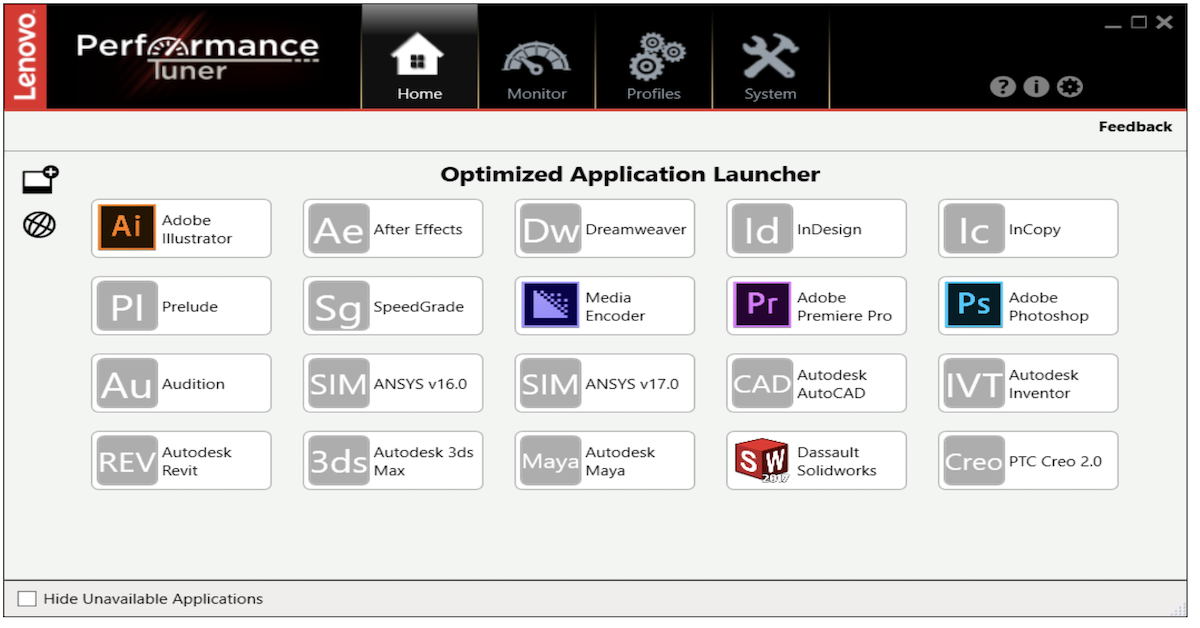
Lenovo Performance Tuner (LPT) 2.0 is a free software tool designed to help you get more performance, productivity, and control from your Lenovo Workstation.
It works alongside the carefully engineered hardware in Lenovo ThinkStation and ThinkPad P series workstations to:
- Optimize system resources for demanding professional applications using pre-defined application profiles.
- Let you create custom profiles that manage power, graphics, BIOS, and processor affinity settings for specific apps.
- Improve performance under load by intelligently assigning CPU cores to critical applications.
In internal testing, Lenovo has seen up to a 73% improvement in performance and speed for AutoCAD 2017 under system stress (measured with PassMark CPUMark) when using LPT 2.0. This helps teams keep projects moving even when systems are running multiple heavy workloads.
How does LPT 2.0 improve performance and productivity in real work?
LPT 2.0 improves real-world performance by managing how your workstation allocates its resources to the applications that matter most.
Key ways it helps:
- Pre-defined application profiles: Many popular professional tools (like CAD, simulation, and 3D apps) have ready-made profiles that tune CPU, GPU, and power settings so they run more smoothly.
- Processor Affinity: You can assign an application to specific CPU cores so it isn’t competing with everything else on the system.
- Two simple presets:
- Performance Enhanced: Gives selected applications dedicated access to the first few CPU cores so they can run more consistently, even when the system is busy.
- Background: Does the opposite—keeps certain applications from consuming all CPU resources, so the rest of your work stays responsive during heavy runs.
- Fine-tuned customization: You can adjust power settings to avoid CPU throttling and tweak visual settings to free up GPU resources.
A practical example comes from the University of Wolverhampton Racing (UWR). Their team designs and simulates Formula 3 car components using tools like SOLIDWORKS and ANSYS, then 3D prints and assembles parts. They use LPT throughout this process to keep design, simulation, and production workflows running optimally, helping them reimagine how they design and build race cars.
Can IT teams manage and standardize LPT 2.0 settings?
Yes. One of the key enhancements in Lenovo Performance Tuner 2.0 is stronger support for IT administration and manageability.
With LPT 2.0, IT teams can:
- Control which profiles are available to users across the organization.
- Define and lock in profile settings (such as power, graphics, BIOS, and affinity configurations) according to IT policy.
- Use downloadable administrative templates to simplify policy deployment and configuration.
The built-in help section in LPT provides detailed explanations of each setting, making it easier for IT to standardize configurations while still giving power users the performance they need.
LPT 2.0 is available as a free download for Lenovo ThinkStation and ThinkPad P series tower and mobile workstations, so IT can roll it out broadly without additional licensing cost.
Lenovo Performance Tuner 2.0 - Get the Most Out of Your Workstation
published by Mid-City Office Systems
Mid-City Office Systems has been in business since 1952 providing products and information technology services to a diverse group of businesses, industries and individuals in Northeast Indiana, Northwest Ohio and Southern Michigan.
Our experienced staff of technology specialists are able to provide fast and efficient services onsite or remotely.
With over 175 years of combined experience in the technology and copier business, we are confident we will be able to serve the needs of your business in a productive, reliable and cost effective manner.




 Sign in with LinkedIn